Process Automation SoftwareUpdated Nov 4, 2026

Custom Process Automation Software

Most 'automation' is a fragile chain of zaps that breaks quietly. We engineer the manual handoffs out of your process into one state machine: the work moves, the next step knows what happened, failures surface, and the business owns the logic.

The short answer

What is Process Automation Software?

Process automation software runs the repetitive steps a team currently holds together by hand: data capture, routing, approvals, follow-ups, status changes, customer updates, and exception handling. Built custom, it models the real process as states and transitions instead of stitching together one-off triggers that nobody trusts.

“No-code chains stitched together in an afternoon, holding until the first real order arrives with a real edge case. The demo always works. The business is what breaks.”

Oscar Otero, Founder & CEO · 14 systems shipped and live

What we automate

Automated handoffs

Steps move themselves between people and systems.

Data capture

Intake once, used everywhere — no double entry.

Follow-ups & reminders

Nothing falls through; the system chases it.

Approvals & routing

Route work by your rules, with an audit trail.

System integration

Connect the tools you keep into one flow.

Visibility

See where every process stands, in real time.

Signs the manual steps are costing you

  • Work lives in spreadsheets passed around by email
  • The same data is typed into three systems
  • Things slip because follow-up is manual
  • Your 'automation' breaks and no one notices

No-code automation fails exactly where the work is

Chained no-code steps are useful for the clean case and brittle everywhere else, which is unfortunate because the clean case was never the expensive part. The cost in a manual process sits in the exceptions: the lead with a missing address, the approval that needs a second opinion, the customer who replies to the wrong thread, the proposal that gets viewed three times but never signed. A zap encountering any of those either fails silently or does something confidently wrong. Both outcomes are worse than the manual step it replaced, because at least the human noticed the exception. Real process automation has to treat exceptions as expected states, not as weird failures outside the diagram.

The mechanism: a process state machine

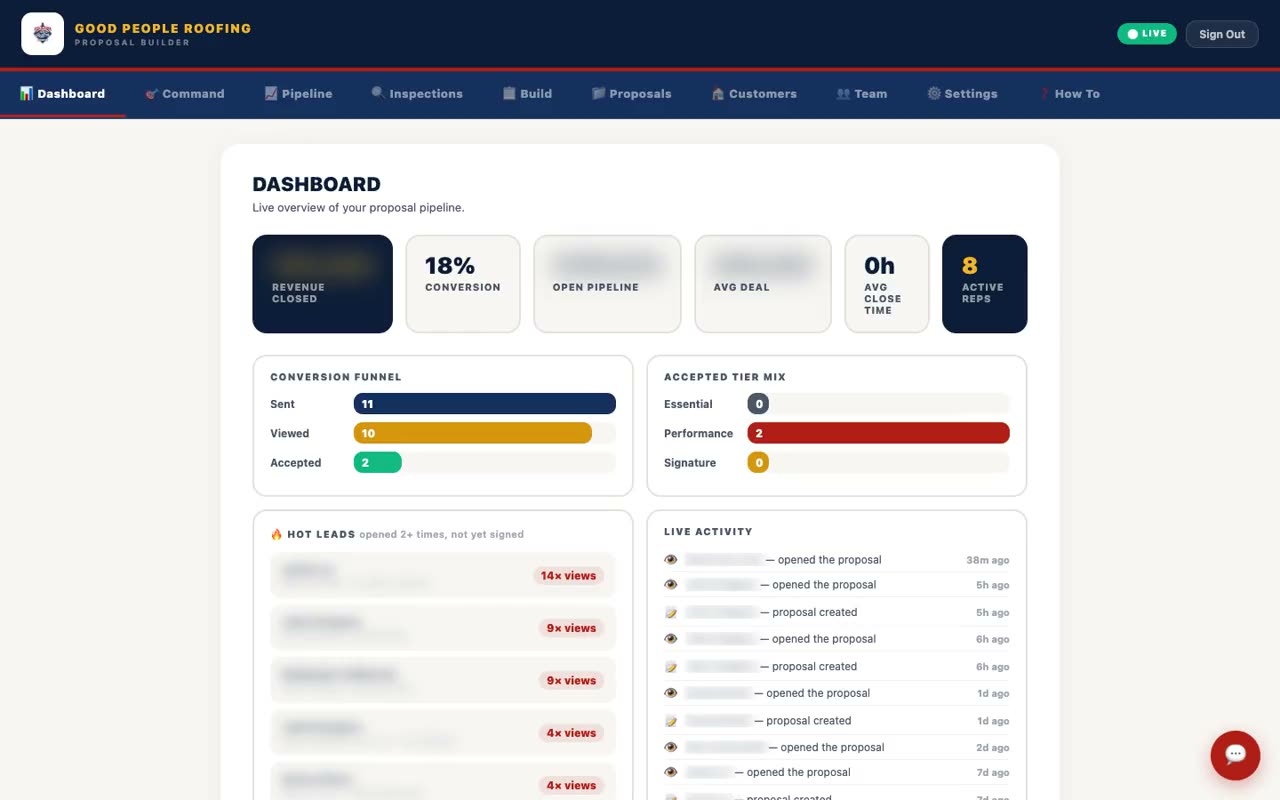
The mechanism we build is a process state machine. The work is not just a row in a spreadsheet or a task in someone's inbox; it has a known state, a set of allowed next states, the data required to move, and a record of who or what moved it. That is the difference between an automation and a pile of triggers. In the Good People Roofing build, a new lead can arrive from ads or the site, pre-fill the builder through a CRM webhook, move into roof measurement, become an inspection, generate a proposal, enter viewed or accepted states, and trigger follow-up only while it remains unsigned. The software knows where the work is. That is why the next action can be automatic without being reckless.

Automation without an audit trail is a liability

Once software acts on your behalf, the question stops being whether it ran and becomes who authorised it, what input it used, and whether the team can prove what happened. A process that sends a customer message, advances a sale, changes a price, moves money, or updates a record needs to leave evidence. This matters commercially before it matters legally. When a proposal was edited, a customer was nudged, or a rep overrode a recommendation, the owner should not reconstruct the answer from memory. The system should show the event trail. Automation with an audit trail is operational infrastructure. Automation without one is a future argument.

The goal is fewer handoffs, not fewer people

Framing automation as headcount reduction usually produces the wrong build, because it optimizes the tasks people perform instead of the gaps between them. Most delay in a real process is waiting: a lead waiting for a rep to notice it, a proposal waiting for a follow-up, a status waiting for someone to update the CRM, a manager waiting for someone to pull the report. Automating the handoff compresses elapsed time far more than shaving seconds off an individual task. The point is not to remove the rep from the sale; it is to make sure the rep starts with the address already filled, the roof ready to measure, the proposal tracked, and the next follow-up queued when the homeowner goes quiet.

Good automation has a human override

The best process automation is not fully autonomous in the theatrical sense. It is opinionated and interruptible. It moves the work forward when the rules are clear, asks for a decision when the rules are not, and records the reason when a human overrides it. Good People Roofing is a useful example because the system does not pretend every roof sale is identical. It can trace a roof from an address, support a structured site inspection, build a tiered proposal, track opens, and nudge unsigned deals. But a rep can still adjust the roof, edit the proposal, and work the homeowner relationship. The automation removes drift and delay, not judgement.

Follow-up is a process, not a reminder

Most teams think they have a follow-up problem because a person forgot to call. Usually they have a process-state problem. The system does not know the proposal was viewed, or knows it was viewed but does not know whether it is signed, or knows both but has no rule for what should happen next. That is why follow-up becomes a sticky note, a CRM task, or a guilty feeling at the end of the day. In the roofing build, unsigned proposals can be nudged for a defined window and stop when the homeowner signs. That matters because the automation is tied to the proposal state, not to a calendar reminder that keeps firing after reality has changed.
How we automate a process

  1. Map the process as performed

    We map the version people actually run, not the version in the SOP. Shortcuts, side chats, manual checks, and exceptions are requirements, because they explain why the current process survives despite being inefficient.

  2. Define the states and transitions

    The work gets explicit states: new, ready, waiting, approved, sent, viewed, signed, blocked, failed. Each transition has rules, required data, and an owner. That state machine becomes the spine of the automation.

  3. Find where work waits

    Elapsed time is usually dominated by queues, not task duration. We identify the places where a record sits because somebody has to notice it, then design the next step to trigger when the prior step is complete.

  4. Automate the handoff, not the person

    Each step triggers the next with the data it needs already attached. The human still makes the judgement calls, but the system stops making them remember every follow-up, status update, and routing rule.

  5. Build approvals, overrides, and the audit trail

    What ran, on what input, under whose authority, and what a person changed are recorded as they happen. That is how automation stays accountable instead of becoming a black box.

  6. Instrument it so you can see it working

    Throughput, failures, stalled work, manual overrides, and elapsed time become visible on a dashboard. If a process improves, the data should show it; if it gets stuck, the system should tell you where.

app.goodpeopleroof.ing
Process Automation Software case study
Case File · Residential Roofing — Home Services

They ran on paper. We rebuilt everything.

Hand-typed quotes and forgotten follow-ups became one connected sales-ops system: CRM-webhook intake, satellite roof measurement, structured inspections, tracked proposals, a 14-day unsigned-proposal follow-up loop, and bilingual customer signing.

  • Satellite measurement
  • 14-day follow-up
  • English or Spanish
  • 1 system
Read the case file →
More proof

5 more systems we built for this

Field notes

Related thinking from the build floor

FAQ

Process Automation Software — questions

How is this different from Zapier or Make?

No-code tools are useful for small glue, but they usually model triggers, not the whole process. We build the process as states, transitions, approvals, failures, and audit records, so the automation can handle edge cases instead of only the clean path.

Will it work with our existing tools?

Yes. We integrate the systems worth keeping and automate the handoffs between them. In the Good People Roofing build, CRM-webhook intake feeds the proposal builder instead of forcing reps to re-type lead details.

What can actually be automated?

The repetitive rules-based parts: data entry, routing, status changes, follow-ups, document generation, reminders, approvals, and alerts. We start with the steps where work waits or gets lost, not with novelty.

What should stay human?

Judgement, relationship management, sensitive approvals, and any exception where context matters. Good automation routes those moments to a person with the right context instead of pretending every case is standard.

What happens when an automation fails?

It surfaces with the input, the step, and the reason, then routes to a person. Silent failure is the specific behavior we design against.

Can a human override it?

Always. Automation that cannot be interrupted by someone who can see something it cannot is a hazard, not a feature. Overrides are recorded so the team can learn from them.

How do we know it is actually saving time?

Because the process is instrumented. Throughput, elapsed time, stalled records, failures, and manual overrides are measured before and after, so the improvement is visible instead of anecdotal.

Do we own it?

Yes. The automation logic lives in your system, with your data and rules. That is the difference between owning a process and renting a workflow someone else can break or deprecate.

Explore more

Related solutions

Tell us how your operation runs. We build the software around it.

Book a Process Automation Audit →
Custom Process Automation Software — Not Duct-Taped Zaps | ParaWav AI